

15 Best eLearning Authoring Tools in 2025
Stop struggling with clunky eLearning software! This list of 15 best authoring tools in 2024 will help you create engaging courses with ease.


Stop struggling with clunky eLearning software! This list of 15 best authoring tools in 2024 will help you create engaging courses with ease.
Finding the best eLearning authoring tools is crucial for creating engaging and effective online courses. With numerous platforms, software, and systems available, you’ll need to really consider your organizational goals and each platform’s features and pricing. This handy guide will help you compare the 15 most popular eLearning development tools in 2025 to find your perfect match!
In case you are strapped for time to review in detail all of the 15 best eLearning authoring tools in this article, here’s a handy comparison table.
| No | Tool | Quality of Output | Speed and Efficiency | Scalability |
| 1 | Articulate 360 | High | High | High |
| 2 | Adobe Captivate | High | Medium | High |
| 3 | iSpring Suite | High | High | Medium |
| 4 | Lectora Inspir | High | Medium | High |
| 5 | Camtasia | High | Medium | Medium |
| 6 | Elucidat | High | High | High |
| 7 | H5P | Medium | Medium | Medium |
| 8 | Gomo Learning | High | High | High |
| 9 | Adapt | High | Medium | High |
| 10 | DominKnow | High | High | High |
| 11 | Easygenerator | High | High | Medium |
| 12 | Evolve | High | Medium | High |
| 13 | LearnWorlds | High | High | High |
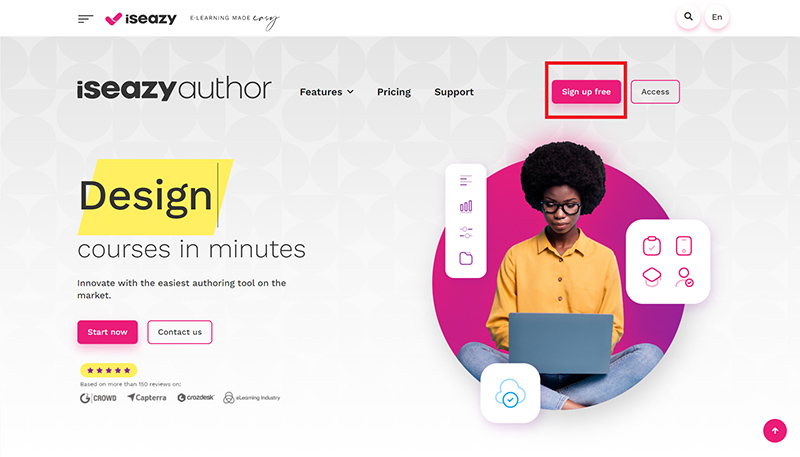
| 14 | isEazy Author | Medium | High | Medium |
| 15 | Visme | High | High | High |
People say: “Without the right authoring tools, eLearning content would be that much harder to create”. So, let’s explore the authoring tools with us to make creating online learning easier than ever.

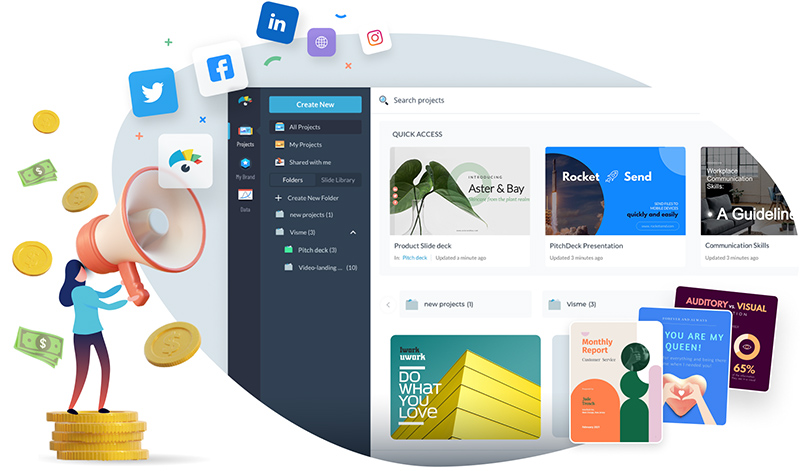
Versatile design platform for presentations, infographics, and interactive content
Nowadays, many leading authoring tool providers offer cloud-based versions of their software. These tools are ideal for those who need to create content on the go, as they do not require any downloading or installation.
The software is typically managed by the vendor, making it easier for users to focus on content creation. Cloud-based tools are hosted centrally, ensuring they are accessible at any time, from any location, and on any device. They are often available as a subscription-based Software-as-a-Service (SaaS) or as part of a public, private, or hybrid hosting solution.
Desktop-based authoring tools require users to download, install, and configure the software before they can begin using it. These tools were extremely popular before the rise of mobile learning, and they continue to be a solid choice for small, co-located development teams or for creating individual learning modules.

Open-source authoring tools are freely accessible to anyone and are often used for eLearning purposes. Many of these tools are SCORM-compliant and enable content creators to quickly build courses featuring text, images, drag-and-drop elements, multiple-choice questions, and open-text responses.
Since they usually offer limited or no support, open-source tools are best suited for organizations with some in-house technical expertise. Alternatively, a third-party vendor may offer a version of an open-source tool that comes with additional support and adaptations.
Choosing the best eLearning authoring tool is critical for creating effective online courses without requiring extensive technical knowledge. With the growing number of options available, it’s important to carefully consider your specific needs before making a decision. Here are eleven key factors to consider
Examine how well the tool supports various types of content, including text, images, videos, audio, and interactive elements like quizzes or simulations. Ensure that it meets the learning objectives and requirements of your audience.

Assess the types of content that can be imported into the tool. While most tools allow for importing presentations, advanced tools may also support the import of Word documents, HTML pages, and video files like MP4.
Explore the variety of interactive elements and assessments the tool offers. Look for features like games, quizzes, drag-and-drop activities, and clickable hotspots that can make learning more engaging and dynamic.

Investigate whether the tool provides customizable templates and branding options to maintain a consistent and professional look across all courses. The templates should be clean, visually appealing, and easy to customize with your organization’s colors, fonts, and layouts.
Consider any advanced features the tool might offer, such as AI-powered suggestions for interactive elements. If AI is involved in content creation, inquire about the underlying models and how they ensure accuracy and originality.
Evaluate how easily the tool allows for updating and scaling content as your course library expands. Scalability is essential for maintaining and growing your eLearning programs over time.
Look into the tool’s development roadmap and ensure it aligns with your long-term goals. This can help you stay ahead of emerging trends and ensure that the tool remains relevant.
Confirm that the tool is compatible with your Learning Management System (LMS) and supports common standards like SCORM and xAPI. Seamless integration is crucial for smooth content delivery and tracking.
Understand the collaboration features available, particularly how the tool handles input from Subject Matter Experts. Check for limitations on contributors and the ease with which feedback can be integrated into the course design.

Investigate the level of customer support provided, including technical assistance and training options. Determine if support is available through multiple channels (e.g., phone, email) and whether personalized training is an option.
Review the pricing structure of the tool, considering whether it operates on a per-user basis, subscription model, or one-time purchase. Take advantage of free trials or demos to evaluate the tool’s performance before making a financial commitment.

Now you know the 15 best eLearning authoring tools to create effective online courses that captivate your learners from beginning to end. To support you in this endeavor, F. Learning is here to help. We have tailored services to meet your needs and goals.
We have extensive experience in transforming text into interactive materials, such as animations, hotspots, hover images, and more. All of these captivating elements are customized to match your learner profile. That’s also an important factor contributing to our strong track record, which helps us gain trust from many reputable corporations worldwide, such as UNSW or Simple Nursing.
Moreover, F.Learning studio even offers a reasonable cost for production while still meeting tight deadlines, which contributes to maximizing profits from your products. Our company is located in Vietnam, a low-spending region of the world, which means the cost is often lowered by 30% than that of other regions.
Want to Transform Your eLearning Experience?
In addition, our team has the technical expertise to create a wide range of interactive elements. Plus, we can seamlessly support uploading these elements to your preferred learning management system (LMS). So share your challenges with us, and we can take the burden off your shoulders.
Selecting the best eLearning authoring tool is crucial for the success of your online courses. By choosing the most suitable authoring tool, you can ensure your content is both effective and memorable, leading to better knowledge retention and a more impactful learning journey. Leveraging the right technology empowers you to deliver high-quality eLearning experiences that resonate with your audience and achieve your educational goals.
Any other problems in creating your eLearning program? Do not hesitate to share with F.Learning for a Free Consultation. We love to support you with our experiences!

F. Learning Studio's Author
Sean Bui, the founder and creative director of F.Learning Studio, is a respected leader in the e-learning and multimedia production industry. With over 10 years of experience, he has dedicated his career to helping organizations create engaging and impactful learning experiences. Under his leadership, F.Learning Studio has grown into a trusted partner for organizations in the education, healthcare, and corporate training sectors, producing over 2,000 minutes of educational animation.
Whether you’re training a team or explaining a message — we’ll help you do it clearly.
Clarity changes everything
Whether you’re training a team or explaining a message — we’ll help you do it clearly.