

11 Simple Steps to Create an Online Training Course Like a Pro
11 easy steps to create an online training course. Build a profitable business and share your expertise. Get started today and reach your ideal learners!


11 easy steps to create an online training course. Build a profitable business and share your expertise. Get started today and reach your ideal learners!
Create an online training course efficiently by following these 11 essential steps. From planning and content creation to selecting the best tools, this guide covers every process stage. You’ll also learn about the Top 10 best platforms for creating online training courses, with comparisons of features, pricing, and unique advantages. Read now!

The online learning market has grown exponentially, driven by the increasing demand for flexible and accessible education solutions. In 2022, the global eLearning market was valued at approximately USD 194.25 billion and is projected to reach around USD 545.38 billion by 2030, online training courses have become a key component for both businesses and educational institutions alike.
This surge in interest is partly due to the rise of eLearning courses, which have become essential for individuals seeking to enhance their skills in a rapidly evolving job market. As more people turn to online education for professional development and personal growth, the potential for creating an online training course has never been greater.
| Step | What To Do |
| 1 | Do some prep work |
| 2 | Make a Course Outline |
| 3 | Select the format of your course |
| 4 | Develop Engaging Content |
| 5 | Add assessments and knowledge checks |
| 6 | Select a Learning Management System |
| 7 | Test and Revise Your Course |
| 8 | Ensure your content accessibility and mobile readiness |
| 9 | Publish your course |
| 10 | Market Your Online Training Course |
| 11 | Collect feedback and testimonials |
Start by defining the training goals and objectives. Clearly outlining what you want learners to achieve by the end of the course ensures that the content stays focused and relevant. This step sets the foundation for developing structured, outcome-driven eLearning courses.

Knowing your targeted audience is crucial for creating a course that resonates with them. Identify their prior knowledge, learning styles, and learning gaps. This will help you design a course that is not only informative but also engaging and tailored to their specific needs.
Selecting the appropriate online training course authoring tools can significantly ease the course creation process. These tools offer templates, multimedia integration, and customization options to help you design a course that aligns with your goals. Many also support interactive training features, allowing you to create engaging activities like quizzes, simulations, and scenario-based learning.
Below is a comparison of the 8 best online training course authoring tools that we gathered for your reference.
| No. | Tool | Key Features | Pricing | User-Friendliness |
| 1 | Articulate 360 | All-in-one tool, responsive courses, interactive templates, LMS integration | Starts at $1,099/year | Beginner-friendly with drag-and-drop features |
| 2 | Adobe Captivate | Advanced multimedia integration, VR support, mobile compatibility | $33.99/month | Ideal for experienced users, steep learning curve |
| 3 | iSpring Suite | PowerPoint-based authoring, quizzes, video lectures, LMS support | Starts at $770/year | Easy to use, especially for PowerPoint users |
| 4 | Camtasia | Video-based content creation, screen recording, simple editing | $299.99 one-time fee | Highly user-friendly for creating video content |
| 5 | Elucidat | Cloud-based, large content libraries, team collaboration, responsive design | Custom pricing based on requirements | Simple interface, suited for teams and large organizations |
| 6 | Lectora | Powerful, SCORM-compliant, ADA-compliant, customizable templates | Starts at $899/year | Moderate learning curve, more suited for larger projects |
| 7 | Gomo Learning | Cloud-based, collaborative, multi-language support, analytics | Custom pricing based on requirements | Easy to use for both individual users and teams |
| 8 | Easygenerator | Drag-and-drop builder, SCORM-compliant, cloud-based, mobile-friendly | Starts at $99/month | Simple for beginners with minimal technical skills |
Creating a clear and structured course outline is the next critical step. Begin by organizing the content into logical sections or modules, ensuring the flow supports the training goals and objectives. This outline acts as a roadmap for the entire course, making it easier to follow and keep on track.
Each section should include key topics, learning materials, learning goals and any activities that promote interactive training. Incorporating interactive elements, such as quizzes or discussions, within the outline helps reinforce key concepts and keeps learners engaged throughout the course.

Choosing the right format for your course is key to effectively delivering the content. Depending on your eLearning course objectives and audience, different formats can cater to various learning styles and preferences. Here are some common formats and when to use them:
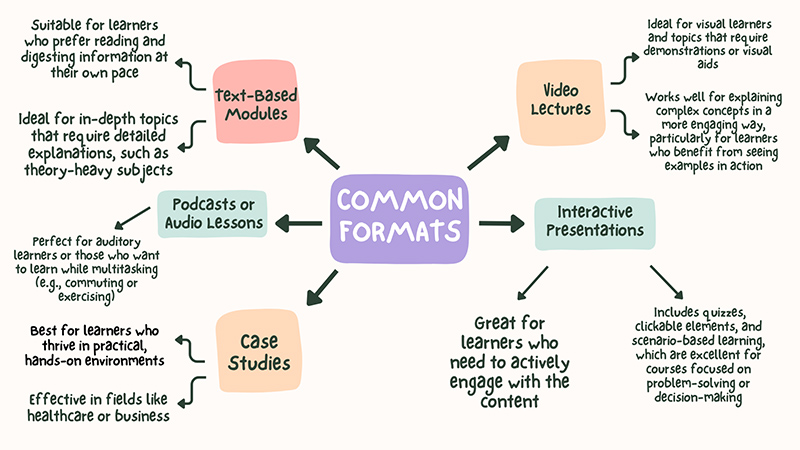
Creating engaging content is vital to keep learners motivated and enhance their understanding. Here are key elements to consider when developing your course:
Incorporating audio and video into your learning modules can significantly boost engagement. Use video to visually demonstrate concepts, showcase real-life examples, or provide expert interviews. Audio can also enhance the learning experience by offering narration or background explanations, making content more accessible and relatable.

Role-play scenarios are an excellent way to encourage active participation and practical application of knowledge. By simulating real-world situations, learners can practice their skills in a safe environment. This interactive method helps reinforce concepts and allows learners to develop problem-solving skills and confidence.
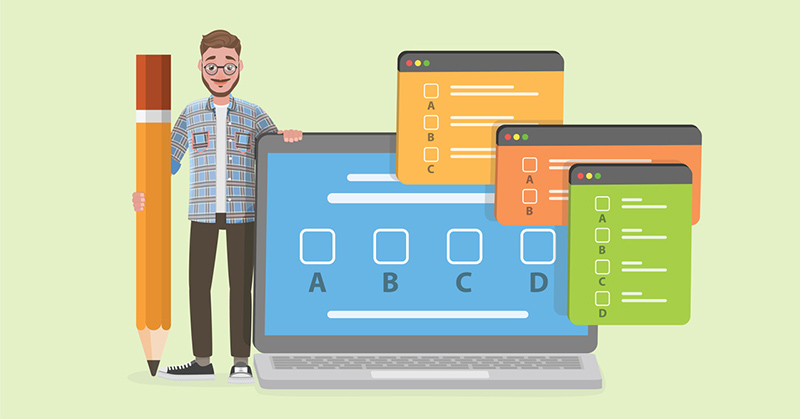
Adding interactive quizzes throughout your learning modules can help assess understanding and reinforce key concepts. These quizzes can be formatted as multiple-choice, fill-in-the-blank, or true/false questions, providing immediate feedback and making learning more dynamic.
Integrating case studies into your course allows learners to analyze real-world situations and apply their knowledge. This method fosters critical thinking and helps learners connect theoretical concepts with practical applications, enhancing their overall understanding.
Collaboration is essential in the course content creation process, as it brings together diverse perspectives that enrich the material. Involving team members – such as subject matter experts, instructional designers, and learners – enhances content quality by ensuring alignment with learning objectives and minimizing errors.
This engagement fosters a sense of ownership among contributors, making them more invested in promoting the course. Additionally, collaboration encourages innovation and creative thinking, leading to more interactive materials.

Incorporating assessments and knowledge checks into your course is essential for measuring learner understanding and progress. Below is how you can effectively implement these elements:
Assessments serve as a way to evaluate whether learners have grasped the material presented in your training modules. They provide feedback to both learners and instructors about areas of strength and aspects that may require additional focus.
Different types of assessments can be utilized to assess learner comprehension:

Implementing knowledge checks at the end of each section or training module helps reinforce learning. These can include:
Offering immediate feedback on assessments helps learners understand their mistakes and learn from them. Detailed explanations for correct and incorrect answers can guide them toward a better understanding of the material.

Selecting the right Learning Management System (LMS) is vital for the effective delivery and management of your online training course. A robust LMS helps you organize your training modules, monitor learner progress, and create a seamless learning experience. When evaluating different LMS options, consider important factors such as user-friendliness, available features, scalability, and integration capabilities with other tools.

Before launching your course, thorough testing is essential to ensure everything functions as intended. Run through the course as a learner would, checking for any technical issues, broken links, or content errors. Solicit feedback from beta testers – individuals who represent your target audience – to identify areas for improvement.
Revise the course based on their feedback, focusing on enhancing the user experience and addressing any concerns they may have. This iterative process helps ensure your course is polished and effective before it reaches a wider audience.

Making your course accessible and mobile-ready is vital for reaching a broader audience. Ensure that your content is compliant with accessibility standards, such as providing alternative text for images and ensuring that videos have captions.
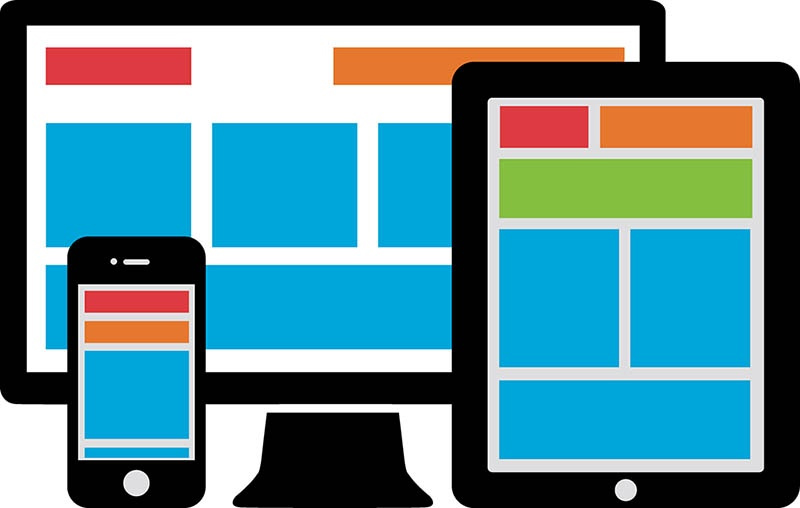
Additionally, optimize your course for mobile devices, as many learners prefer to access content on their smartphones or tablets. A responsive design enhances the user experience, allowing learners to engage with the course anytime and anywhere.
Once your course is tested and revised, it’s time to publish it on your chosen LMS. This step involves uploading all course materials, configuring settings such as enrollment options, and setting a launch date. Make sure to provide clear instructions for users on how to navigate the course. Once published, monitor the platform for any issues and be ready to provide support to learners as they begin their journey.
Marketing is key to attracting learners to your online training course. Here are some effective tactics:

After your course is live, gathering feedback and testimonials from learners is essential for continuous improvement. Encourage participants to provide their thoughts on the course content, structure, and overall experience.
Use surveys or feedback forms to collect this information systematically. Positive testimonials can be powerful marketing tools, helping to build credibility and attract new learners. Display these testimonials prominently on your course landing page and in promotional materials to enhance your course’s appeal.

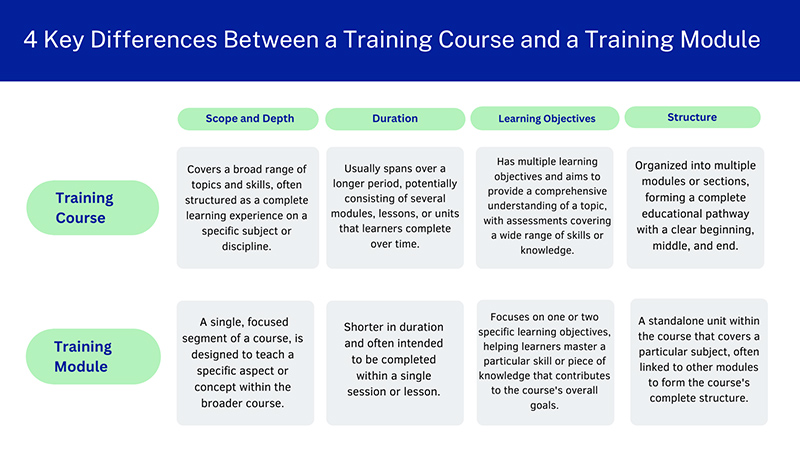
When it comes to designing effective educational programs, it’s essential to understand the distinctions between a training course and a training module. Each plays a unique role in the learning process, and recognizing their differences can help you structure your content more effectively.
Creating an online training course has never been easier, thanks to a variety of platforms designed to cater to different needs and preferences. In this section, we will explore the top 10 best platforms that empower educators and trainers to create, market, and sell their online courses efficiently.
| No | Platform | Best For | Standout Feature | Pricing |
| 1 | Udemy | Launching your first course | Guided, prescriptive course creation flow | Free; 3% to 63% revenue share on course sales |
| 2 | Skillshare | Teaching creative skills | Quick, easy course setup | Free; royalties for premium class minutes watched |
| 3 | Teachable | Creating an online school with marketing | Wide-ranging AI features in beta | Free for 1 published course and 10 students; from $39/month |
| 4 | Podia | Selling digital products and memberships | Simple course outline builder | From $33/month plus 5% transaction fee |
| 5 | Kajabi | Marketing a course on autopilot | Loads of built-in marketing features | From $55/month |
| 6 | Mighty Networks | Building a paid community | Strong community-building focus | From $99/month for plans that include online courses |
| 7 | Simplero | Managing your business | All-in-one CRM, marketing automation, and courses | From $59/month |
| 8 | LearnWorlds | Granular customizability | Extensive visual customization options | From $29/month plus $5 per sale |
| 9 | Pathwright | Action-oriented courses | Actionable lessons and curriculum design | From $89/month |
| 10 | Thinkific | Customizable add-ons | Course templates, pre-populated with sample content | From $36/month |
While creating an online training course on your own might seem cost-effective, there are significant drawbacks to consider. DIY courses can often lack the professional polish and quality that learners expect, leading to decreased engagement and effectiveness. Additionally, without expertise in instructional design, you may struggle to create a structured and coherent learning experience.
Hiring a professional studio ensures that your course benefits from industry knowledge, advanced tools, and effective teaching strategies, ultimately resulting in a high-quality product that meets the needs of your audience and enhances learning outcomes. Investing in professional assistance can save you time and lead to a more successful and impactful training course.

F.Learning Studio stands out as a premier choice for creating an online training course, offering services designed to elevate the learning experience. Here’s how we excel in delivering exceptional online training solutions:
At F.Learning Studio, we understand that every learner wants to choose the best option. Hence, we prioritize creating customized learning experiences that cater to the specific needs of your audience. Our team works closely with you to design courses that align with your training objectives, ensuring maximum engagement and effectiveness.

Our commitment to high-quality content is evident in our animation and interactive design services. F.Learning Studio offers various types of services, including:
Explore our Engaging Interactive Design!
We believe that a smooth content development process is key to create successful online training courses. F.Learning Studio provides comprehensive services such as:

At F.Learning Studio, we don’t just aim to deliver a one-time course; we prioritize creating online training programs that drive long-term learning success. This means ensuring your learners can apply new skills in real-world scenarios and retain knowledge over time. Through our expertise in instructional design and interactive content development, we build courses that encourage engagement, repetition, and practical application, fostering continuous learning and skill reinforcement even after the course has ended.

Creating an online training course involves several crucial steps, from conducting thorough preparation to selecting the right learning management system and ensuring content accessibility. By following a structured approach, you can develop an engaging and effective training program that meets the needs of your audience.
If you’re looking to streamline this process and enhance the quality of your course, F. Learning Studio is here to help. With our expertise in customized learning experiences, high-quality animation, interactive design, and seamless content development, we can turn your vision into a successful online training course.
Don’t hesitate to reach out to us for a free consultation and discover how we can elevate your training programs!
Still not sure which is the best option for your current budget?

F. Learning Studio's Author
Sean Bui, the founder and creative director of F.Learning Studio, is a respected leader in the e-learning and multimedia production industry. With over 10 years of experience, he has dedicated his career to helping organizations create engaging and impactful learning experiences. Under his leadership, F.Learning Studio has grown into a trusted partner for organizations in the education, healthcare, and corporate training sectors, producing over 2,000 minutes of educational animation.
Whether you’re training a team or explaining a message — we’ll help you do it clearly.
Clarity changes everything
Whether you’re training a team or explaining a message — we’ll help you do it clearly.