

9 Examples of Customer Service Training Videos to Boost Skills
Improve customer interactions with our 10 hand-picked customer service training videos. See examples of effective communication, problem-solving, and more.

Improve customer interactions with our 10 hand-picked customer service training videos. See examples of effective communication, problem-solving, and more.
Today’s customers demand exceptional support, but traditional customer service training often struggles to keep pace. Slide decks get ignored, manuals go unread, and service quality suffers, impacting loyalty. A well-crafted customer service training video is the key to make your training faster and more effective.
In this article, you’ll explore 10 standout examples of customer service training videos, learn what makes a video effective, and get expert tips on how to distribute training videos that actually improve performance.
But before delving into the article, let’s watch an example of a customer service training video to see how it can simplify training:
So, how exactly do customer service training videos solve the problems we just talked about? Before diving into examples, let’s look at why video has become the go-to format for businesses serious about improving service quality, employee performance, and customer loyalty.
Understanding the why is just the beginning. To really see the impact of great training videos, you need to watch them in action. Up next, we’ve handpicked 10 standout examples that show how customer service training videos bring theory to life.
Overview: This concise training video from HubSpot Academy outlines seven fundamental skills crucial for customer support representatives. Each skill is briefly explained, providing a clear understanding of its importance in delivering exceptional customer service.
What makes it stand out:
Quick tip: Incorporating short, focused training videos like this one into your learning programs can effectively reinforce key customer service skills and promote continuous professional development.
Overview: This is a satirical short film that portrays a child’s lemonade stand plagued by poor customer service practices. Through exaggerated scenarios, it showcases common service pitfalls, such as unhelpful staff, rigid policies, and lack of empathy, all within the context of a simple lemonade stand.
What makes it stand out:
Quick tip: Using humor and relatable scenarios in training videos can effectively illustrate common mistakes and encourage better customer service practices.
Overview: The video is designed to equip frontline employees with effective communication strategies for handling challenging customer interactions. It emphasizes the importance of empathy, active listening, and appropriate language to resolve customer issues and enhance satisfaction.
What makes it stand out:
Quick tip: Incorporating daily scenarios about customer service like the video above can help your employees be well-prepared to handle customer issues.
Overview: This instructional video outlines a structured six-step approach for conducting effective tech support sessions. It emphasizes the importance of clear communication, empathy, and professionalism in resolving customer issues efficiently.
What makes it stand out:
Quick tip: For training videos focused on processes, break down the information into clear, sequential steps with actionable advice for each stage. Using visual aids like text overlays and real-world examples can significantly enhance understanding and retention.
Overview: In this animated RSA Short, Dr. Brené Brown delves into the profound difference between empathy and sympathy. Using engaging storytelling and illustrative animation, she emphasizes that empathy fuels genuine connection, while sympathy can inadvertently drive disconnection.
What makes it stand out:
Quick tip: Visual metaphors make abstract ideas in customer service like emotional connection feel tangible and easy to grasp.
Overview: In this engaging keynote, Mark Sanborn shares the inspiring story of “Fred,” his mail carrier who consistently went above and beyond in his duties. Fred’s dedication, attention to detail, and genuine care for his customers exemplify how ordinary roles can be transformed through extraordinary service.
What makes it stand out:
Quick tip: Storytelling makes concepts like dedication and service excellence more human, not theoretical.
Overview: “Poor vs Great Customer Service” by Odyssey Training contrasts two customer service experiences to highlight the impact of staff attitude on customer satisfaction.
What makes it stand out:
Quick tip: Use contrasting scenarios in training to vividly demonstrate the consequences of poor versus great service. This method helps employees understand the tangible effects of their behavior on customer loyalty and brand reputation.
Overview: This is an insightful animated video that explains the critical role customer service plays in business success today. It highlights key statistics about customer expectations, common frustrations, and the powerful impact of both good and bad service on customer loyalty and company reputation.
What makes it stand out:
Quick tip: Opt for icons, illustrations, and infographic-style to simplify complex topics and break down key ideas.
Overview: This is a comprehensive phone etiquette training session designed to help staff master telephone communication. Presented by a customer service expert, it covers practical techniques to sound polished, professional, and empathetic on the phone
What makes it stand out:
Quick tip: Incorporate short, animated videos into your training programs to effectively convey essential customer service skills. This approach can enhance employee engagement and retention of key concepts.
Ready to bring your training vision to life? Book a FREE consultation with F. Learning Studio to get expert guidance on the right style, format, and length for your customized customer service training video.
Inspired by the examples? Great—but not all training videos are created equal. If you want your own video to actually work, you need to understand what makes it effective. Let’s break down the key ingredients that turn a generic video into a powerful training tool.
Before hitting record, define exactly what the viewer should learn or be able to do after watching. Clear objectives give your video direction and ensure it’s not just informative but actionable. When goals are aligned with business outcomes, your training becomes a tool for performance, not just compliance.
Abstract theory doesn’t stick. Realistic, relatable scenarios help employees visualize how to apply skills in everyday conversations. Whether it’s dealing with an angry customer or resolving a billing issue, these examples offer context, and context builds confidence.

Visual storytelling grabs attention and makes complex ideas easier to digest. Combine on-screen text, animations, or real footage with voiceovers that speak in a relatable, human tone. This keeps learners engaged while reinforcing the customer-centric mindset you want to build.
Bite-sized videos focused on one skill at a time are easier to remember and apply. Instead of a long training session, use microlearning from 2 to 5-minute videos that address specific issues like active listening or de-escalation. It fits better into busy schedules and encourages repeat viewing.

Great training is inclusive. Make sure your videos are easy to access across devices, support subtitles, and are translated or localized if needed. This ensures every team member, no matter where they are, can learn without barriers.
Your team may be scattered across time zones or speak different languages. Make sure your training video includes subtitles, translations, or mobile-friendly formats so no one is left behind. Accessibility isn’t just about convenience, it’s about inclusion and effectiveness.
Without tracking, you’re guessing. Pair your videos with quizzes, feedback forms, or LMS integration to measure comprehension. Monitor completion rates and skill assessments to identify what’s working and what needs improving.

Now that you know what makes a training video work, the next step is figuring out how to make one without wasting time or budget. Whether you want to DIY it or hire a studio, we’ll help you weigh the options and choose what’s best for your team and goals.
Creating a customer service training video on your own is a cost-effective option, especially for small teams or internal rollouts. With the right tools and planning, you can produce engaging, effective videos without a big budget.
Here’s a step-by-step guide to help you get started:
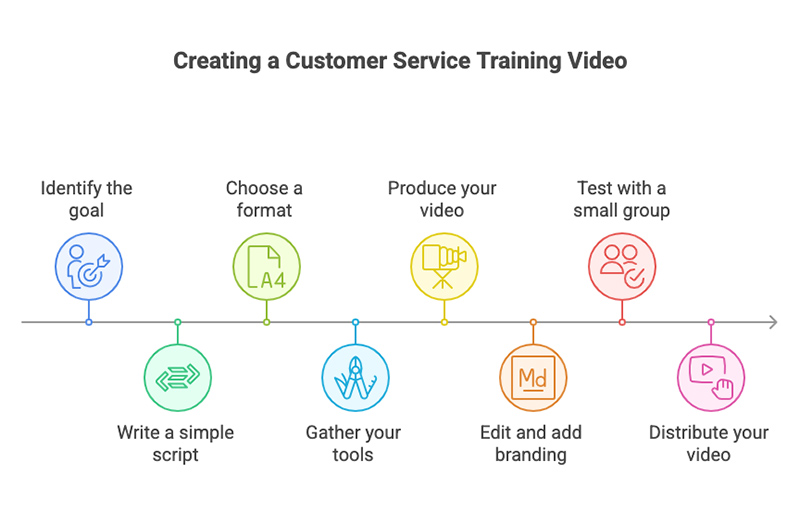
1. Identify the goal of your video
Decide what specific skill or behavior you want to train. Is it handling complaints, active listening, or proper phone etiquette? Keep the goal focused and measurable.
2. Write a simple script
Structure your script with a clear beginning, middle, and end. Use plain, conversational language. Include examples or scenarios that reflect real customer interactions.
3. Choose a format
Pick the video style that best matches your message, audience, and available resources. Here are some tips to guide your choice:
4. Gather your tools
With just a laptop, a decent microphone, and the right software, you can produce high-quality content on a budget. Below is a list of tools to help you with recording, editing, and enhancing your video:
| Software | Key features | Price |
| Loom | Screen + webcam recording, easy sharing, basic editing tools | Free (Pro from $12/mo) |
| OBS Studio | Open-source screen recorder, live streaming, supports advanced video capture | Free |
| Canva Video | Drag-and-drop video editor, templates, animation, branding tools | Free (Pro from $12.99/mo) |
| CapCut | Simple timeline editor, auto-subtitles, effects, transitions | Free |
| Camtasia | Screen recording + powerful editing, interactive quizzes, animations | $299 one-time (free trial available) |
| iMovie | Basic editing for Mac users, transitions, music, text overlays | Free (Mac only) |
| Shotcut | Open-source video editor, supports many formats, filters, and effects | Free |
| Audacity | Audio recording and editing, noise reduction, easy voice cleanup | Free |
5. Produce your video
Once your script and format are ready, it’s time to bring your content to life.
For live-action or Screen Recordings: Use your smartphone, webcam, or screen recording tools. Find a quiet, well-lit space.
For Animation:
6. Edit and add branding
Trim any mistakes, add your logo, and insert on-screen text or highlights to reinforce key points. Tools like CapCut, iMovie, or Canva Video can help.
7. Test with a small group first
Share the video with a few team members, gather feedback, and adjust if necessary. Ask if the message is clear and actionable.
8. Distribute your video
Upload the video to your LMS, Google Drive, company intranet, or share via email or team chat tools. Make it easily accessible for your team.
Get more advice and tips to create effective customer service training videos:
| Step | Description |
| 1. Define Your Training Goals | Clarify what you want the video to achieve—e.g., onboarding, skill-building, service recovery. |
| 2. Research and Shortlist Studios | Look for studios with experience in eLearning or customer service content. Check portfolios. |
| 3. Share Your Brief and Requirements | Provide your goals, target audience, tone of voice, length, and preferred style (live-action, animation, etc.). |
| 4. Review Proposal and Timeline | Evaluate project scope, pricing, turnaround time, and any creative suggestions from the studio. |
| 5. Collaborate on Script and Storyboard | Work closely to ensure content accuracy and brand alignment before production begins. |
| 6. Approve Production Plan | Confirm final script, voiceover tone, visual style, and logistics for filming or animation. |
| 7. Provide Feedback During Review | Review drafts and give feedback on pacing, visuals, clarity, and technical accuracy. |
| 8. Final Delivery and Formats | Receive the finished video in various formats for LMS, mobile, or internal platforms. |
| 9. Distribute and Track Impact | Upload to your channels, then measure employee engagement, comprehension, and retention. |
Let us help you create a customized customer service training video that fits your team's needs, brand voice and learning goals.
Choosing the right studio can make or break the effectiveness of your customer service training video. The ideal partner doesn’t just produce high-quality visuals, but they also understand how people learn, how to keep them engaged, and how to align content with your brand and goals.
Here’s what to look for:
If you’re considering hiring a studio to create your customer service training video, that’s great. But we understand that one of the first questions that comes up is cost. And the truth is—it depends. The price can vary widely based on factors like video length, animation style, script complexity, voiceover needs, and whether it’s a one-off or part of a series. This is a cost overview so you know what to expect to invest in for a high-quality, professionally produced customer service training video.
| Types of video | Price range |
| Live action | $1,500+ to $10,000+ per minute |
| Animated video | $1,500+ to $10,000+ per minute |
| Screencast video | $1,000+ to $4,000+ per minute |
| Interactive video | $2,000+ to $15,000+ per minute |
Even the best training video won’t make an impact if it sits unnoticed in a shared drive. To maximize reach and results, you’ll need a smart distribution strategy. Here are five proven ways to get your video in front of the right people—right when they need it.
Customer service training isn’t always memorable. But when it’s done right, it can shape how your team speaks, listens, and connects with every customer. At F. Learning Studio, we don’t just make videos—we design learning experiences that stick. Here’s how we can support your team:
Every team is different—and so is every customer interaction. That’s why we don’t do one-size-fits-all videos. At F. Learning Studio, we design customer service training videos customized to your learners’ preferences, your brand voice, and your real-life service scenarios.
Whether your team responds best to step-by-step walkthroughs, scenario-based storytelling, or quick microlearning modules, we adapt the tone, pacing, and visuals to suit their learning style. We also make sure every video reflects your brand’s values, from how your team speaks to how they solve problems. The result is training that feels relevant, familiar, and truly your own—because that’s what makes it stick.
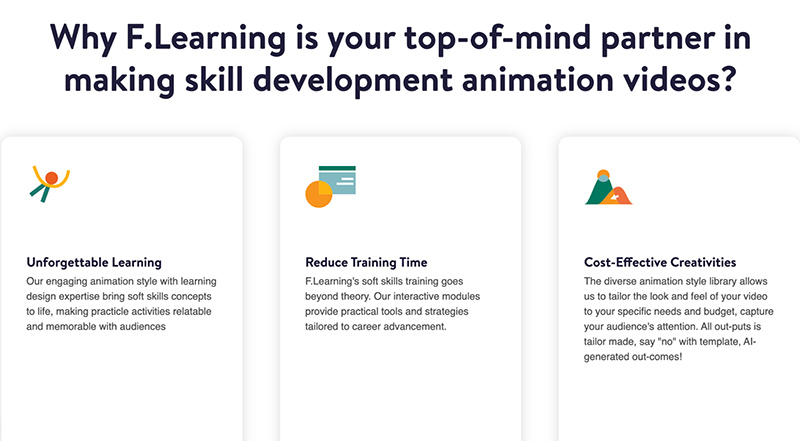
Your team deserves more than just another talking head video. With F. Learning Studio, you get visually engaging content grounded in instructional design. We use animation, storytelling, and scenario-based learning to bring customer service moments to life, covering skills like empathy, de-escalation, and active listening in ways your team won’t forget.
Let us help you create a customized customer service training video that fits your team's needs, brand voice and learning goals.
Not sure what your customer service training video should look like, or if it’s worth the investment? We’re here to help you explore it risk-free. At F. Learning Studio, we offer a FREE consultation to understand your training needs, goals, and team dynamics.
Moreover, we’ll provide a FREE demo video so you can see exactly how your content could come to life. No pressure, no strings attached, just a chance to experience our creative approach before committing. It’s our way of helping you take the first step toward training that’s not just informative, but actually inspiring.
Customer service is where loyalty begins, and learning is where great service starts. A thoughtfully crafted customer training video has the power to shift behaviors, spark empathy, and turn ordinary reps into standout service professionals.
If you’re ready to get started, let F. Learning Studio support your next step with expert advice to create engaging and effective videos your team will actually want to watch. Contact us today!
Read more:

F. Learning Studio's Author
Sean Bui, the founder and creative director of F.Learning Studio, is a respected leader in the e-learning and multimedia production industry. With over 10 years of experience, he has dedicated his career to helping organizations create engaging and impactful learning experiences. Under his leadership, F.Learning Studio has grown into a trusted partner for organizations in the education, healthcare, and corporate training sectors, producing over 2,000 minutes of educational animation.
Whether you’re training a team or explaining a message — we’ll help you do it clearly.
Clarity changes everything
Whether you’re training a team or explaining a message — we’ll help you do it clearly.