

Animation in eLearning: A Guide to Using Animated Videos in 2025
Do you find your lessons are often not engaging enough to capture learners’ attention and convince them to remember knowledge? How could a good thing…


Do you find your lessons are often not engaging enough to capture learners’ attention and convince them to remember knowledge? How could a good thing…
Do you find your lessons are often not engaging enough to capture learners’ attention and convince them to remember knowledge? How could a good thing become useless? What has gone wrong? Well, there’s nothing wrong with the knowledge itself. The problem is the way to deliver it. It’s time you found another method that fits in the online environment, like animation in eLearning.
“Can animation work well with our LMS?” We’ve received a lot of these questions when working with Digital Learning Managers. You want to ensure that any changes do not break current resources, we understand. And the answer is yes.
ELearning animation is highly compatible with LMS. Animated videos can run smoothly on all video-supported management platforms. Plus, they go for an awful lot of uses, such as creating small quizzes or tests, integrating with other materials like talking-head videos or presentations, and so much more. By combining different elements and illustrations, you can diversify the experience your eLearning course provides. On top of that, integrating animation with other materials will better clarify different aspects of a subject.
For example, take a look at the following video from Permaculture Design Online Course.
In this talking-head course, we helped integrate animation for Permaculture. You can see Geoff Lawton, the mastermind behind the whole project, explaining the concept of a “food forest.” He displays his results in real life but sometimes turns to clarifying several related natural concepts. Most of them are impossible to picture or invisible to the naked eye. This is where eLearning animation comes into play. It illustrates the phenomena that otherwise cannot be seen.
You May Also Like:
To remain staff’s productive, you have to keep online training content short. That’s the concept of microlearning for employees. But you may ask for a video format that keeps knowledge concise. That’s where the animation comes in. Through the means of visualization, animated videos cut off long-form content and explain complicated concepts shortly. With creative designs and captivating motions, they clearly lay out the knowledge, ready for learners to pick up. Take a break from walls of text and use animation in eLearning instead. Let art capture focus your audience’s attention and convey your messages!
Recommend reading:
Animated videos are management-friendly. You can simply add or remove this material from your eLearning courses with a click of the mouse. Technology has also made updating relevant information “a walk in the park.” Provided that you already have the updated version produced, it takes just seconds to upload and sync. Yes, we know talking-head or live-action videos can do the same, but not as quickly. Moreover, the human element involved in these types of videos (actors, editors, directors,…) poses a great challenge to updating the course or producing a sequel. It will be costly and inconsistent, something none looks for. That won’t be your concern when you use animation in eLearning.
Make your online and hybrid course more engaging with simple animation guide, why not?

First impression counts, and so does training. “It should be fun!” – most of the Digital HR Managers we’ve worked with agree that. But how to do it fun? Here’s the tip: put animation at the beginning.
Animation excels at redirecting the audience’s attention. Use it at the beginning of a chapter or a topic to kick off a strong opening. By engaging learners right from the start, you will have a better chance of leaving an impression and winning their focus.
This method is particularly useful in orientation presentations, where employers tend to cover a lot of abstract and theory-based knowledge. You don’t want to lose your crowd right off the bat with dull and dry information. So, introduce animation to nab their attention for the best results.
Here is one of our best animated instructional video examples we made for clients:
Storytelling benefits online communication. We all agree that. But animation can use a little more work. With visualization advantage, you can use animation in eLearning to use its storytelling ability to engage learners and encourage their attendance to the content. This would come in handy for topics that require practical knowledge. For example, business and finance. Experiential learning is essential to these fields, as it deals with both actual situations and hands-on practice. The video from F. Learning Studio – one of the best elearning financial services – will be an excellent illustration.
When working with some Digital Training Managers who use animation for the first time, we realize that a lot of them are concerned about the industry gap. Does it fit in my specific knowledge? Since the business model is different, animation needs to be flexible.
Animation in eLearning has the power to bring all concepts and scenarios to life. It convincingly explains certain aspects of life, such as the law of physics, human organs, assembly-line instruction, safety guidance,… The list goes on. Also, it makes describing these phenomena seem effortless. It has the ability to paint the most unfortunate accidents or regretful failures without actually having any troubles or making a mistake.
Above is our online course specifically made for the Aviation Industry. The video discusses the no-fly zones in Australia, which need illustration to demonstrate details of heights and dangerous situations for learners. And why do we animate the course in this way? It’s because in the Aviation industry, drone benefits the business but it also causes hidden accidents to other flying objects.
As a digital training manager, you could want to keep track of employee’s progress or performance and review your effort. It’s even impossible sometimes for employers to evaluate the effectiveness of the training course. Animation can help you tackle this problem, too. L&D planners can simply use animation in eLearning or training to create small games or quizzes at the end of the course. They switch learners from receiving information right to the giving end of the process.
One of our customers uses animated games and quizzes. And it’s nothing like what your employees experienced before. They act as a welcomed change that helps summarize knowledge and evaluate learning results in a fun way. The new tracking method saves her a lot in the tracking paper system. If the audience really pays attention to the test, they will give an honest performance, which you can keep a record of for later evaluation.
Understanding your crowd is the very first step to success. Sound similar, huh? You understand your learner, and we want it to. Find out the knowledge they need to learn, the skill they lack, and the things that appeal to them. This basic information creates a framework for us to build the project around. It also makes sure the eLearning is helpful and relevant to learners.
Recommend reading:
Animation comes in various shapes and forms, each has its own set of strengths and weaknesses. Navigating your way through all of those selections to choose just one suitable type can be a real challenge. To use animation in eLearning effectively, consider contributing factors such as the target audience or the field of expertise. Taking a look at the company’s workplace culture may reveal another clue. See if your corporate environment leans towards formal or informal, youthful or mature, then decide what route to take accordingly.
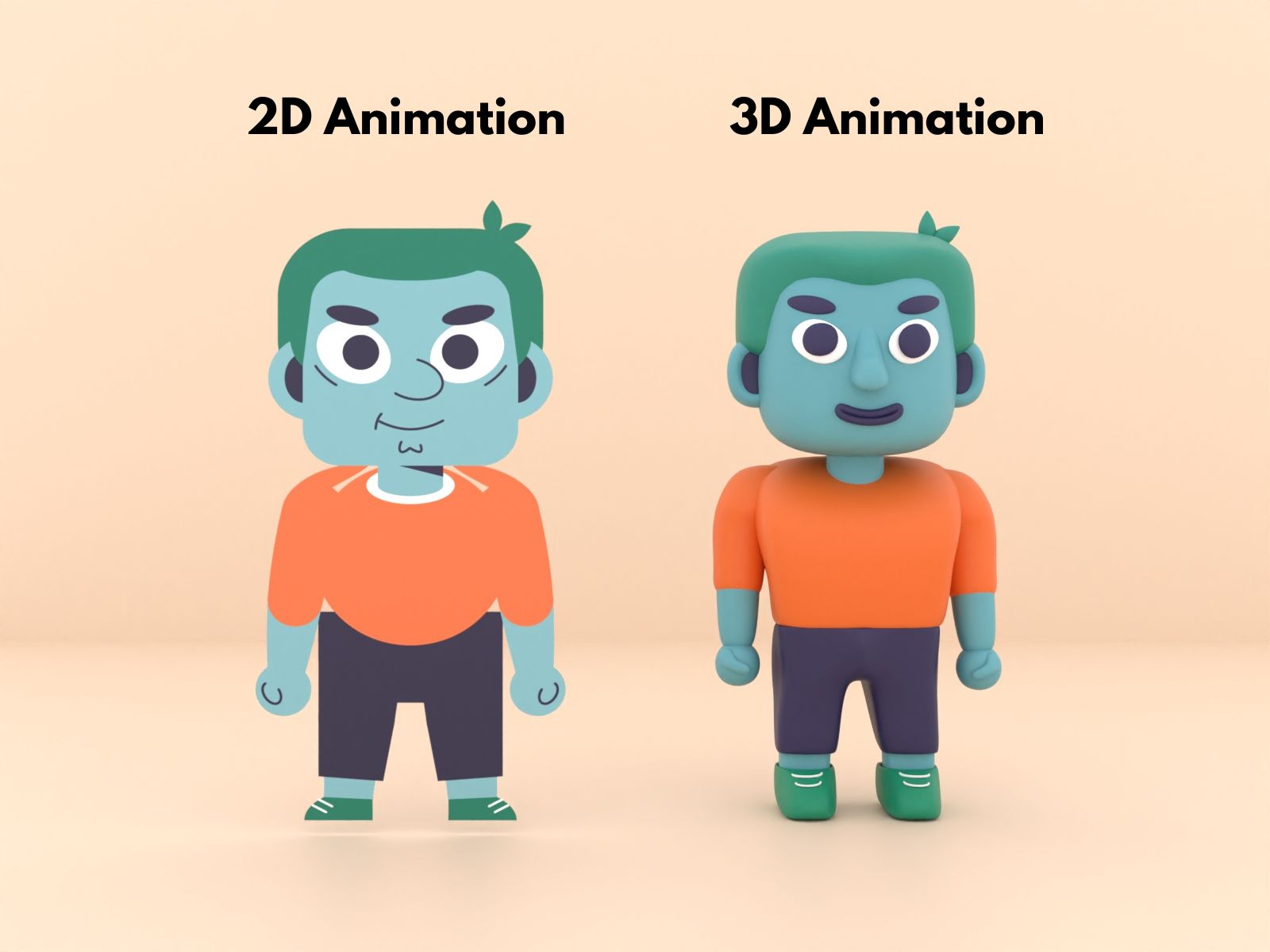
Speaking of animation for eLearning, the most popular options are whiteboard animation, 2D motion graphics, and 3D animation. Whiteboard animation is the most affordable type of the three, offering a clean display on a white background. 2D motion graphics is the intermediate choice that boasts simple motions and an easy-to-follow structure. Lastly, we have 3D animation as the most expensive choice. Yet, it showcases concepts in the most detail with incredible depth from all angles.
Recommend reading:
Choose designs that will speak volumes to your audience. From understanding what they like or do not like, you can create different characters or choose appropriate color schemes for the project. But remember to include familiar elements of the company to make the art relatable. It brings a sense of closeness that engages learners better.
Small finishing touches will elevate your animation in eLearning course. They mean the difference between a good training course and an exceptional one. So, make sure you go the extra mile to add details whenever possible. Maybe include some inside jokes or information. Always double-check for those common errors. That shows your attention and care to the project, which creates a lasting impression on the audience.

The goal of writing an RFP (request for proposal) is to increase the chance of securing the service providers that your company needs. A compelling RFP attracts quality vendors and minimizes wait time so that your project can finish to a high standard in a fast fashion. In this case, you want to notify top animation studios or independent vendors about your eLearning course. So, how can you write an RFP that guarantees responses?
Here are the steps you need to follow:

Recommend reading:
A training video production may save you time and energy. At F. Learning, we are working on bringing a great online learning experience. And we understand how stressed you are when improving the online training program.
Here’s what we will offer to your business:
Get more ideas to start your animated training video through our successful case studies
| Software | Introduction | Features | Pricing |
|---|---|---|---|
| VideoScribe | Whiteboard animation software for creating professional-looking videos easily. | – Drag-and-drop interface – Pre-built templates – Hand-drawn effects – Cloud storage | – $14/month (Monthly) – $665 (Lifetime) |
| Renderforest | All-in-one platform for videos, logos, and websites with a focus on ease of use. | – Cloud-based editing – AI-based tools – Customizable scenes – HD export – Music integration | – $14.99/month (Amateur) – $49.99/month (Business) |
| Animaker | User-friendly animation software for short videos and presentations. | – Character builder – Pre-built templates – 4K export – Real-time collaboration | – $10/month (Basic) – $39/month (Pro) |
| Moho | 2D animation software with advanced tools for creating cartoons and films. | – Bone rigging – Smart bones – 3D camera effects – Scripting support | – $59.99 (Debut) – $399.99 (Pro) |
| Pencil2D | Free and open-source 2D animation software focused on traditional hand-drawn animation. | – Simple interface – Raster & vector support – Onion skinning – Cross-platform compatibility | – Free and open-source |
| Adobe After Effects | Professional-grade animation and visual effects software used in film and digital media production. | – Advanced compositing – Keyframe animation – 3D rendering – Integration with Adobe apps | – $20.99/month (Individual) – $54.99/month (All Apps) |
VideoScribe is an easy-to-use whiteboard animation software that allows users to create engaging and professional-looking videos without needing advanced design skills. It is popular for educational content, explainer videos, and marketing campaigns.
Features:
Pricing:
Renderforest is an all-in-one platform for creating videos, logos, websites, and mockups. It is known for its ease of use and offers a wide range of tools for creating animations, including explainer videos, promotional content, and educational videos.
Features:
Pricing:
Animaker is designed for creating short videos, explainer animations, and presentations. It is ideal for beginners and professionals alike, offering a drag-and-drop interface with a wide range of customizable elements.
Features:
Pricing:
Introduction:
Moho (formerly Anime Studio) is a 2D animation software that combines traditional animation techniques with advanced animation tools. It is widely used for creating cartoons, films, and animations for various media.
Features:
Pricing:
Pencil2D is a free and open-source 2D animation software that focuses on traditional hand-drawn animation. It is lightweight and easy to use, making it an excellent choice for beginners and hobbyists.
Features:
Pricing:
Adobe After Effects is a professional-grade animation and visual effects software used in film, television, and digital media production. It is highly versatile and known for creating motion graphics, visual effects, and complex animations.
Features:
Pricing:
One QBE Insurance Group is one of the world’s top 20 general insurance and reinsurance companies. Its staff consists of more than 14,500 people from 37 different countries around the globe. Before contacting F.Learning, One QBE Insurance had already produced a script and storyboard for their instructional design. However, the company still needed to upgrade the existing materials to train all of its employees.
The biggest challenge One QBE faces is that the majority of its internal training course is abstract and in-depth knowledge. Listening to hours-long lectures online doesn’t sound like what the employees may like. Then comes the problem of scale. Being a global corporation, One QBE values consistent training quality throughout all branches across the globe. That means all 14,500 staff members have to receive the same course quickly and effectively. They cannot afford to lose too much opportunity cost.
Understanding One QBE’s working environment, F.Learning opted for a formal design. We stayed true to the company’s characters and culture to stimulate its real-life workplace. That helps the video remain relatable while successfully delivering knowledge.
Being a global corporation, One QBE takes branding very seriously. Therefore, we decided to keep the training video in coherence with the brand guidelines. F.Learning Studio adopts the basic elements of the brand guideline such as its color, font, logo, and basic shapes. Then we elevate them by creating new characters and backgrounds in relation to their brand color. That’s how One QBE’s branding guideline inspired us to create the new visual design.
Again, these are two very abstract concepts that need clarifying. Our team of experienced creators worked hard to illustrate how One QBE’s new tool operates from start to finish. We also slipped in a few ideas of the potential impacts the tool would have on the company. All of One QBE’s 14,500 employees can now witness first-hand how their operating the new tool can influence the whole system.
Our mission to upgrade the look of One QBE’s original internal training course was a major success. We delivered an in-depth course for the company’s global employees that was also easy on the eye. With the new and improved course, One QBE’s employees can relate to the familiar designs as F. Learning Studio stuck with the original. The eLearning animation video helped effectively maintain One QBE’s brand image in branches around the world.
Animation is the perfect material to include in your eLearning projects. It’s versatile, effective, and budget-friendly. Take a break from the boring walls of text or lifeless illustrations and use animation in eLearning instead. Use the power of storytelling to tell your stories and stimulate your audience.
If you wish to learn more about animation or F.Learning Studio’s services, don’t hesitate to book a consultation call with us! It’s free.
Read Further:

F. Learning Studio's Author
Sean Bui, the founder and creative director of F.Learning Studio, is a respected leader in the e-learning and multimedia production industry. With over 10 years of experience, he has dedicated his career to helping organizations create engaging and impactful learning experiences. Under his leadership, F.Learning Studio has grown into a trusted partner for organizations in the education, healthcare, and corporate training sectors, producing over 2,000 minutes of educational animation.
Whether you’re training a team or explaining a message — we’ll help you do it clearly.
Clarity changes everything
Whether you’re training a team or explaining a message — we’ll help you do it clearly.